
Google Business Profile Service-Area Rules for Roofers, Garage Door and Appliance Repair Companies
A practical guide to choosing the right profile type, defining realistic service areas and avoiding common Google Business Profile shortcuts for home-service companies.
Dzmitry Khmialeuski
Founder-led field note
If your team drives to the customer, your Google Business Profile is not configured the same way as a storefront. That sounds simple, but it creates one of the most common local-marketing mistakes I see: an owner treats the service-area field as a list of cities they want to rank in instead of an accurate description of where the business can actually deliver.
For roofers, garage-door companies and appliance-repair teams, the right setup starts with business reality. Where does the team operate? Can customers visit the listed address during stated hours? Is there a separate crew at each claimed location? The answers should control the profile, not a wish list of keywords.
Service area is a customer promise, not a ranking radius
Google says local results are mainly influenced by relevance, distance and prominence. A service-area setting helps describe where you operate, but it does not erase the customer's location or guarantee visibility across a metro area.
That distinction matters. Adding 20 cities does not create 20 offices. It tells customers that you serve those places. If your dispatch team cannot reliably reach one of them, the profile is promising something the operation cannot consistently deliver.
Use this test:
- Would you accept a normal job in this area this week?
- Can your team reach it within the arrival window you advertise?
- Does your website describe the same service area?
- Would a customer be surprised to learn where the business is actually based?
If the answer breaks down, narrow the area before trying to expand it.
Pick the correct business type
Service-area business
Choose this model when employees travel to customers and customers do not visit your address. A home-based roofing company, mobile garage-door repair business or appliance technician often fits this model.
Google's current guidance says the address should be hidden when customers are not served there. The profile can still show the cities or postal codes the business serves.
Hybrid business
Choose this model when customers can visit a real, staffed location during stated hours and the team also travels to customers. A garage-door showroom with employees on site and field technicians may qualify. A mailing address without staff and signage does not become a storefront because it appears on a website.
Storefront
Use a storefront profile when customers are received at the location during business hours. Do not select this just to display an address more prominently.
Configure the service area accurately
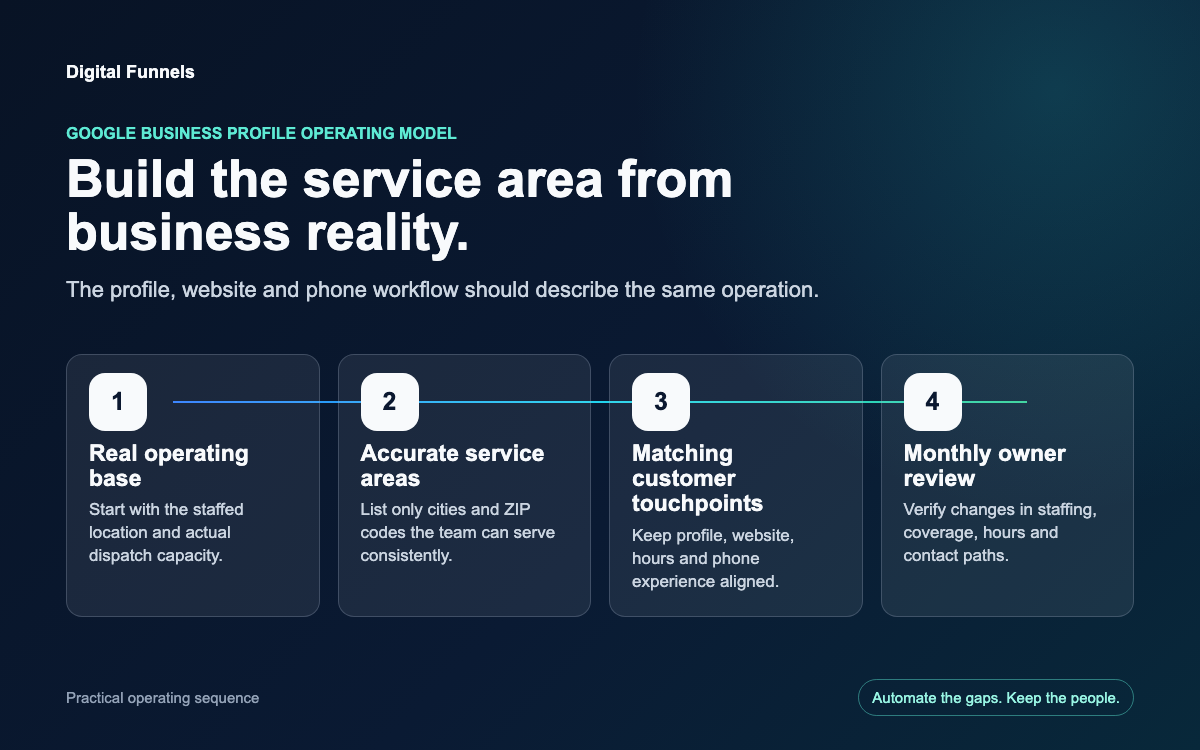
Google currently allows service areas to be entered by city, postal code or another supported area. The old editable radius model is not the current setup. Google also states that a profile can include up to 20 service areas and that the overall boundary generally should stay within about two hours of driving time from the business base, with limited exceptions.
A practical setup process:
- Export the last 60 to 90 days of completed jobs.
- Group them by city or ZIP code.
- Remove areas that produced one unusual job but are not part of normal dispatch.
- Compare the list with the service pages and booking form on your website.
- Select only the areas the team is prepared to serve consistently.
- Recheck the list when staffing, vehicles or operating hours change.
This is more useful than asking, "How many cities can I add?" The better question is, "Which areas can we support without creating a bad customer experience?"
One profile or multiple profiles?
The default for a service-area business is one profile for its central location. Google's representation guidelines allow separate profiles when the business has real, separate locations with separate staff and service coverage. Creating extra profiles for rented mailboxes, virtual offices or unstaffed addresses can conflict with those guidelines and create suspension risk.
For a growing home-service company, document each location before creating another profile:
- lease or ownership of the operating location;
- permanent business signage where required;
- employees assigned to that location;
- customer-facing hours;
- a distinct operational service area;
- a phone and website experience that represent the actual location.
Do not let a marketing tactic get ahead of the operation.
What each home-service niche should show
Roofing
List the real roofing services the company performs, not every adjacent construction category. Keep storm-response hours accurate, show current crew and project photos, and make the service area match where estimates and jobs are actually accepted.
Garage-door repair
Separate emergency repair, opener repair, spring replacement and installation when they are real services. If there is a showroom, make sure customers can actually visit it during the listed hours. If there is no showroom, hide the operating address.
Appliance repair
State which appliance types and brands are serviced without implying authorization you do not have. Keep the travel area tight enough to support arrival windows. If different technicians cover different territories, manage that operationally rather than creating unsupported profiles.
Check the phone, website and hours together
Google's guidelines call for a phone number controlled by the actual business. Call tracking can be useful, but the number and landing experience must still represent the business rather than redirect customers to an unrelated lead generator.
The three surfaces should agree:
- Google Business Profile: current phone, hours and service area;
- website: the same business identity and realistic coverage;
- call or booking workflow: the team can actually respond during the hours shown.
This is where local visibility becomes an operating-system problem. A perfect profile cannot rescue a phone that nobody owns or a booking request that disappears.
A monthly 20-minute audit
Once a month, have one person verify:
- business type is still correct;
- hidden or visible address matches customer reality;
- service areas match current dispatch capacity;
- primary and secondary categories describe real work;
- phone, website and hours work;
- holiday hours are current;
- new photos show recent work;
- profile edits or duplicates have not introduced conflicts.
Record the date and owner of the check. Small, boring controls prevent expensive profile emergencies.
Where automation helps
Automation can monitor missing fields, stale hours, unanswered reviews, service-area drift and inconsistent website information. It can create a prioritized task list and remind the right person.
It should not invent a location, publish an unsupported service or change critical profile facts without human approval.
That is the operating philosophy behind Digital Funnels: automate the gaps, keep the people. The system should make the owner and team more consistent, not make business decisions on their behalf.
If you want a prioritized view of the largest public-profile gaps before changing anything, run the Free Business Scan. For a deeper explanation of the managed work, see Google Business Profile management and local visibility solutions.